
Up to date packets, podman built in, well known and therefore easy to find help, sensible defaults.
- 10 Posts
- 84 Comments
Joined 2 years ago
Cake day: June 8th, 2024
You are not logged in. If you use a Fediverse account that is able to follow users, you can follow this user.
That looks very clean. Though I wouls describe my setup as middle ground between your first and second pricture. I have a defines place for everything, just a few open cables.
What do you use to provide power to your drives?

 1·15 days ago
They are 12V fans so I soldered them to the 12V output that also powers the HDDs.
It is ok, the vents are at the back and bottom of the laptop. I have run it in a different 24/7 setup for some time already.
Mostly beans.
I didn’t get a case, I printed one. I am not sure what you mean by “just screm em on”.
Also, if you look carefully at the post, there are two 80mm fans.
I could, yes. The laptop has an M.2 slot that is intented to be used for M.2 SSDs, maybe you know them, they’ve gotten very popular. Almost any mordern motherboard has space for them.
But instead of putting an M.2 SSD in that slot, I bought this adapter with SATA ports. And this adapter fits exactly in the same spot as the SSD could have. Then the SATA ports of the adapter can just be used as regular SATA ports as on any motherboard.
 2·15 days ago
I used PETG, and so far there is no warping/deformation. With PLA I would be a bit more worried, but PETG can stand some heat.
Also slightly bugging me, but I didn’t find 6x SATA power. And my plan always was to use 4 drives.
But I do not have a separate NAS. I do have a laptop I want to use as a NAS.
This way I have keyboard and screen attached in case I want to use it, and designing around the motherboard seemed more work for not much benefit. I do have enough rack space to not need to care about bulk, the server will not be in a place anyone can hear it and noone will regularly look at it as well, so it does not need to be pretty.
I opted for easy maintainance and tried to not overengineer it, so that it can get used sooner.
No, but installing the adapter itself is exactly the same as installing an M.2 SSD. Afterwards you treat it the same as regular SATA ports in a PC. You connect the SATA data cables to the HDDs and the adapter, and provide power to the HDDs. Power is not handled by the adapter, this is what the DC 12V/5V converter is for.
Does this help you?
Yeah there is a gap between the disks.
Did you read the whole post? I thought I made clear what I did.
I was also very happy to find out they exist, otherwise this whole thing would’ve been a no-starter.
:)
I have to press the power button.
I am running fedora server, and yes. Serialnumbers, SMART data, all seems well. Am a bit surprised by that as well.
Fair, however, I have run this laptop in a different 24/7 setup for years and it was fine. Also the laptop lives in a place where noone needs to hear it.






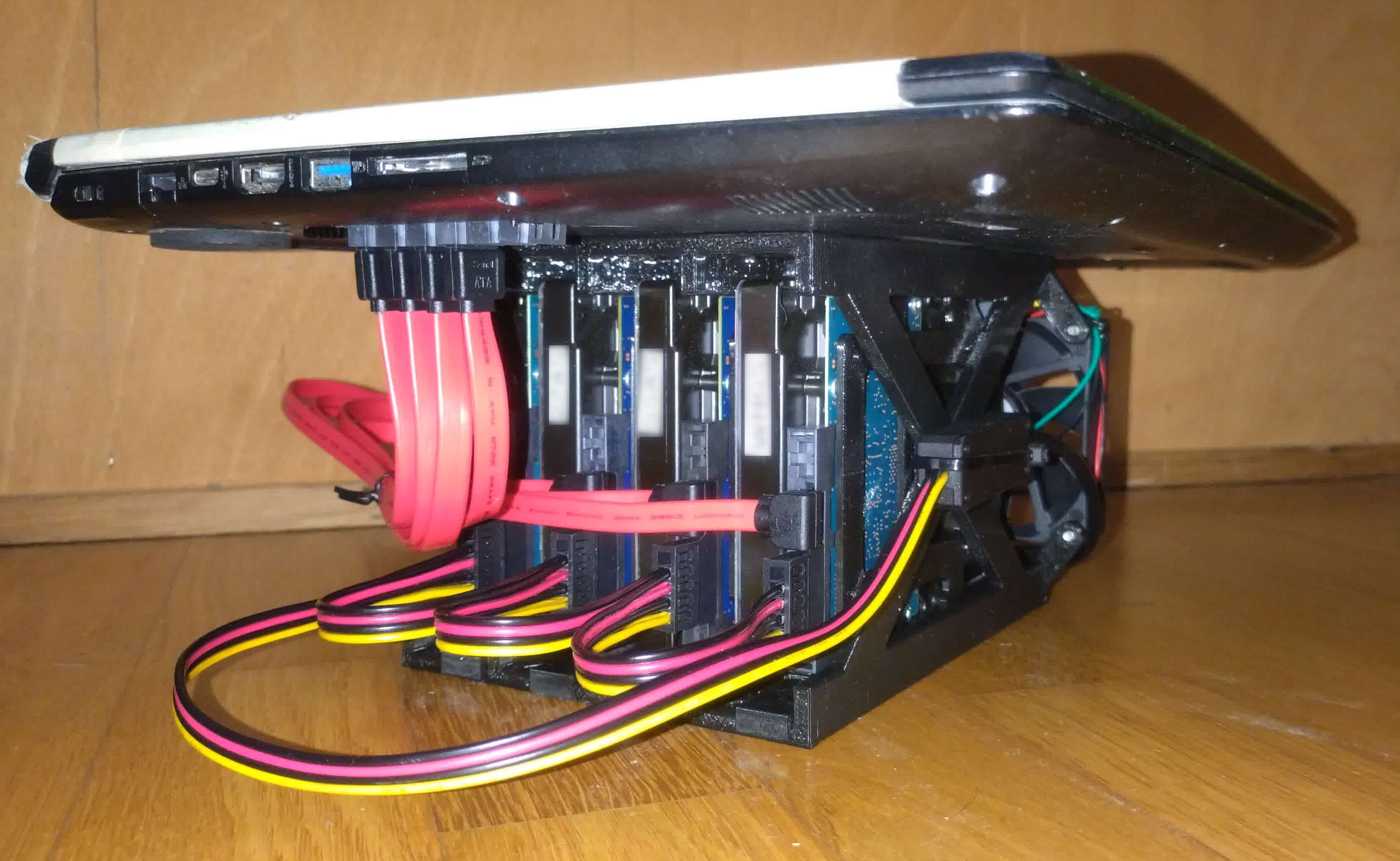


The HDDs have their own 12V 10A PSU.