
Since switching to fedora, I have been testing out its features and i just now ran into my first problem; Since my laptop doesn’t have a SD card reader, I have to use an external SD card reader when i want to access my microSD cards. I recently tried to put in my Acer 2-in-1 SD Card reader and my system did not pick up that i inserted the card reader. I’m not sure on what I am supposed to do about that, so if anyone can give me any advice I’ll appreciate it.
Update: So I decided to put in a different brand of SD card into the card reader (to test if the card could be an problem) and Dolphin immediately read and put it in the removable device section. The sd card that is having issues was a Sandisk card. Verbatim was mounted easily, so something is going on with my Standisk card.
Yes, i had a card in the reader. My laptop will show that the UsB reader is inserted but it dosent show the card nor the reader in my files folder.
Ok. Can you tell me more about what you are using? Are you on KDE and using Dolphin for the file manager? If Dolphin, do you see anything at all under removable devices? What file system is the card formatted as?
Can you also try running:
sudo journalctl --followin a terminal, plug in the reader, and check if you see something like “kernel: sd 12:0:0:1: [sdc] Attached SCSI removable disk”.Yes, Im on KDE and i use Dolphin. Nothing shows under removal devices when i look on the folder screen. When i get the some free time, im gonna run the commands that some of yall gave me to see where the issue is.
Okay, so I ran this command and I don’t see anything of that nature relating to the SD reader. I was also writing the commands from Tal’s comment and it’s not picking up the SD card reader at all, nor of what’s in it. It just reads the +sda, zram0 and nvme0n1
Gonna make an edit real quick: so the system is picking up the disk I see it labeled as [sda] Attached SCSI removable disk but the microSD card is not being read into the disk nor is it showing on the Dolphin file manager that it’s there.
ok, so I think if it sees the device being plugged in, then it probably sees the card reader. You could try running
lsusbto see all your USB devices, andlsblk -o NAME,FSTYPE,MOUNTPOINTSto see your block devices (disks), and see if it appears there also.It still may not be able to actually read the file system even though it sees it as a disk. One reason for that could be it’s not supported by your kernel. Do you know what file system the card is formatted with? If it appears in the lsblk output, it will say in the second column.
Edit: when I tested this with my own card reader, I see this output:
$ lsusb
Bus 002 Device 002: ID 0bda:0301 Realtek Semiconductor Corp. multicard reader
$ lsblk -o NAME,SIZE,TYPE,FSTYPE,MOUNTPOINTS NAME SIZE TYPE FSTYPE MOUNTPOINTS sda 3.6T disk ├─sda1 16M part └─sda2 3.6T part ext4 /mnt/disk2 sdb 0B disk sdc 0B disk sdd 0B disk sde 0B diskEach device (sda, sdb, sdc) is a physical disk. sda is my SSD. sdb, sdc, sdd, and sde are all “drives” from the multi-reader. Each type of card shows as its own, basically.
Now if I plug a card in, I get a little icon in the system tray (disk and devices) where I can mount and open it. And this has appeared in my
lsblkoutput:That is a 64GB SD card formatted with exfat.
Okay, so I’m copying what your posting and this is what I get: this is what it looks like without the SD card reader. (Also, sorry for the late responses, I haven’t been on my laptop lately)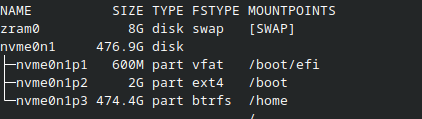
Now this is what it looks like with the card reader inside: I also have one of my flashdrives in and I see my flashdrive identified but i dont think i see the SD card reader, I am not sure.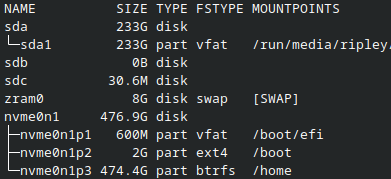
That looks promising actually. Are you able to read the contents of the path that starts with
/run/media? If you lost the contents do you set your files? If so, then Linux sees it and it auto mounts, but Dolphin isn’t recognizing it.the /run/media is identifying my USBC flashdrive (this is not the SD card reader,btw) Dolphin recognizes it and puts it under “Removable devices” section and I can access my folders. Now, this is me taking out the USBC flashdrive but i still have my SD card reader in: its like Dolphin dosent recongize the SD card reader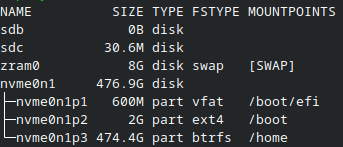
I see. My bad, I was reading it on my phone. If you don’t have the flashdrive connected, and you only have an nvme drive in your laptop, then the sdb and sdc devices would be from your card reader. I am thinking sdc is the card reader since it shows 30.6M size. However that would be a very small card in 2026. It’s a little surprising to me it’s not even showing partitions for sdb or sdc in lsblk output.
Is the card pre-formatted (or did you format it)? Is it readable on another device?
Edit: I forgot to mention: if your card is formatted as exfat, you may need to load the exfat module:
If you have it, you should see exfat in the output from the second command. More information here
No it’s not formatted. It came as is when I bought it and I have not done anything to it besides putting my microsd cards in it. And you are right, that disk under sdc is the SD card reader.
Crazy thing, this SD card reader was reading fine when I was using Pop Os (even though cosmic was hella buggy). Idk… I kinda find this freaking ridiculous that it cant read it when this is the default file manager.
but let me see if it’s labeled as exfat…