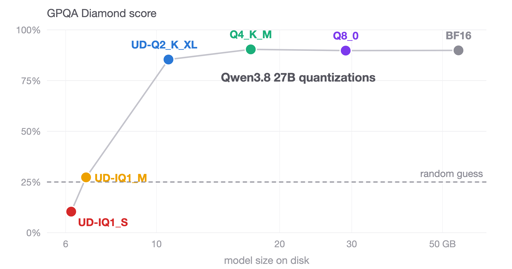
I test Unsloth GGUFs of Qwen3.8 27B (Q4_K_M, UD-Q2_K_XL, UD-IQ1_S) with llama.cpp on GPQA Diamond, IFBench, Terminal-Bench 2.1. Q4_K_M matches BF16 abd fits an RTX 4090.
I don’t know if I’m doing this right, but this is what llama-bench just gave me:
>llama-bench -m 'C:\...\models\unsloth\Qwen3.8-27B-GGUF\Qwen3.8-27B-UD-Q4_K_XL.gguf' -p 2048 -n 128
ggml_cuda_init: found 2 CUDA devices (Total VRAM: 34815 MiB):
  Device 0: NVIDIA GeForce RTX 3090, compute capability 8.6, VMM: yes, VRAM: 24575 MiB
  Device 1: NVIDIA GeForce RTX 3080, compute capability 8.6, VMM: yes, VRAM: 10239 MiB
load_backend: loaded CUDA backend from F:\llama\llama-b10764-bin-win-cuda-12.4-x64\ggml-cuda.dll
load_backend: loaded RPC backend from F:\llama\llama-b10764-bin-win-cuda-12.4-x64\ggml-rpc.dll
load_backend: loaded CPU backend from F:\llama\llama-b10764-bin-win-cuda-12.4-x64\ggml-cpu-haswell.dll
| model                          |       size |     params | backend    | ngl |            test |                  t/s |
| ------------------------------ | ---------: | ---------: | ---------- | --: | --------------: | -------------------: |
| qwen35 27B Q4_K - Medium       |  16.34 GiB |    27.32 B | CUDA       |  -1 |          pp2048 |       1599.03 ± 3.30 |
| qwen35 27B Q4_K - Medium       |  16.34 GiB |    27.32 B | CUDA       |  -1 |           tg128 |         37.11 ± 0.76 |

build: 3d3d7c818 (10764)
The motherboard is pretty basic (Asus Prime X570-P) so the 3090 is connected to PCIe at 16x speed and the 3080 at 4x speed, which will slow things down a bit. The OS is Windows. I have Linux on the machine too but I haven’t tried it under Linux yet.


T/s?
I don’t know if I’m doing this right, but this is what llama-bench just gave me:
The motherboard is pretty basic (Asus Prime X570-P) so the 3090 is connected to PCIe at 16x speed and the 3080 at 4x speed, which will slow things down a bit. The OS is Windows. I have Linux on the machine too but I haven’t tried it under Linux yet.